

Zero-touch provisioning – Onboarding without manual IT intervention
How quickly can new employees become productive in your organisation? In practice, the onboarding process often does not run as quickly or smoothly as desired. Too many manual processes delay the setup of accounts, access rights and applications.
Zero-touch provisioning, on the other hand, promises that new employees will immediately receive all the access they need, entirely without any manual intervention from IT.
🤔 But does this ‘hands-off’ approach really work, and how can fully automated provisioning be successfully implemented?
We’ll give you a practical insight into the subject and show you how our FirstWare IDM-Portal efficiently handles onboarding with zero-touch.
Index
What is zero-touch provisioning?
Zero-touch provisioning (ZTP) is a trend in modern onboarding:
New employees automatically receive all the necessary access to systems, applications and communication channels from day one – and they do so ‘touchlessly’. Instead of manual, individual steps across different departments, which often involve tickets, emails or Excel lists, automated, rule-based processes ensure an almost magical provisioning of all access.
In other words, IT does not need to intervene and everything is provisioned automatically:
- Accounts in Entra ID and Active Directory are created automatically,
- group permissions and licence assignments take effect immediately.
👍The benefits:
Automation reduces the error rate, and all systems use identical, verified data. The IT department is relieved of routine tasks. Compliance with legal requirements is also improved, as all permissions are granted according to a defined scheme and are documented in an audit-proof manner.
That all sounds good. But are there any downsides?
Of course, zero-touch provisioning does not mean ‘set it and forget it’. For automation to work reliably, you need a clean database, clear role and permission models, and stable system integrations. Inaccurate rules lead to incorrect permissions, and special cases must be handled via workflows. However, with good preparation and monitoring, these risks can be successfully managed.
The opposite: manual onboarding and why it is problematic
Perhaps it’s a bit of an exaggeration to say that manual onboarding is simply no longer appropriate in the age of digitalisation. Nevertheless, it’s still the norm in many German public authorities and companies. This involves a range of tasks, such as:
- Creating user accounts, setting up email inboxes, assigning licences, granting permissions, coordinating with specialist departments, preparing devices, making manual changes when roles change (and offboarding is part of this too)
🤯 It is time-consuming, error-prone and difficult to scale. Very often, it leads to duplicate and sometimes inconsistent data maintenance. Different systems, roles and permissions also make it difficult to maintain an overview.
How do you implement zero-touch provisioning?
HR triggers the creation of the complete user identity
Zero-touch provisioning solves these problems by automating all steps and making them traceable.
But first, the question arises: where do you start?
It all begins not in IT, but in the HR department. At least, that is often the case.
Think of it this way: your HR department is the first to know when a new employee joins or when there is a change in personnel. As soon as a new employee is entered into an HR system, the automation generates the complete user identity in real time.
➡️ The entry in the HR system triggers all subsequent steps, so to speak.
A unified identity is automatically generated. This includes, for example:
- user accounts (e.g. Active Directory / Cloud),
- group memberships,
- Email address,
- Teams assignments and
- application rights.
All parameters are generated automatically based on rules and templates previously defined by IT.
Roles and rules create magical moments
The most important step: you must define the roles and rules in advance. That is where the real ‘magic’ lies.
- If department = Sales → then access to X
- If role = Manager → then access to Y
- If location = DE → then systems A, B, C
The automated logic ensures that permissions are assigned on a role- and/or attribute-based basis.
It’s all about controlled lifecycle automation
At the same time, ZTP is not just about onboarding, but about lifecycle automation. As soon as anything changes – a change of role, someone leaving – everything is either automatically
- removed and reset or
- deactivated/revoked.
At the same time, Zero-touch does not mean a loss of control.
It only works with:
- Logging (who received what and when)
- Reports (e.g. for audits)
- Policy checks
Zero-touch provisioning with the IDM-Portal
Now we know the key steps, but how should zero-touch provisioning work in practice? Is fully ‘zero-touch’ onboarding and user lifecycle management really possible, or is the devil in the detail?
The good news is that our IAM solution FirstWare IDM-Portal makes zero-touch provisioning possible.
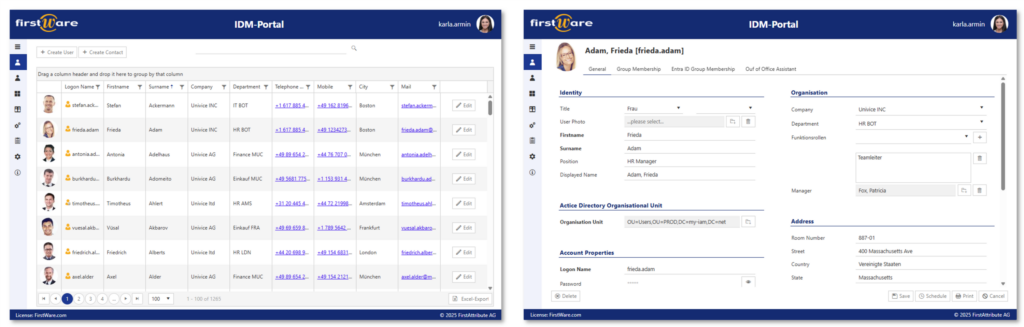
The IDM-Portal ensures that
- user accounts are fully automatically provisioned,
- permissions can be easily requested or approved,
- access is automatically adjusted in the event of role changes, departmental changes or time-limited permissions,
- reliable monitoring and reporting audits everything.
💡Interesting: Not everything always has to be 100% automatic. In many companies, self-service or approvals are desirable, even a must! The IDM-Portal enables this too:
- Departments can request rights.
- Approvals are handled via workflows.
- Implementation thereafter remains automated, of course.
We can share our own experience of how we implemented this.
Case study: Automating HR processes
We enable zero-touch provisioning for our clients by integrating their HR systems (LogaHR, Personio, SAP SuccessFactors, Workday, etc.) with the IDM-Portal. As soon as the HR process is triggered, a complete user identity is created.
The automated workflow in detail:
- As soon as a new employee is created or updated in the HR system, the process begins. An automatic full export securely transfers all relevant master data to the IDM portal.
- The IDM portal automatically detects the changes. It identifies new entries, department changes or departures without the need for an administrator to intervene.
- This is where the ‘magic’ of Zero Touch happens. Based on the department or position, the system automatically assigns the user:
- the correct group memberships,
- specific address details and,
- role-based access rights.
- The data is written directly to the desired directory or connected cloud systems.
- Every step is logged in an audit-proof manner, whilst the relevant departments (e.g. IT support for hardware issuance) are automatically notified.
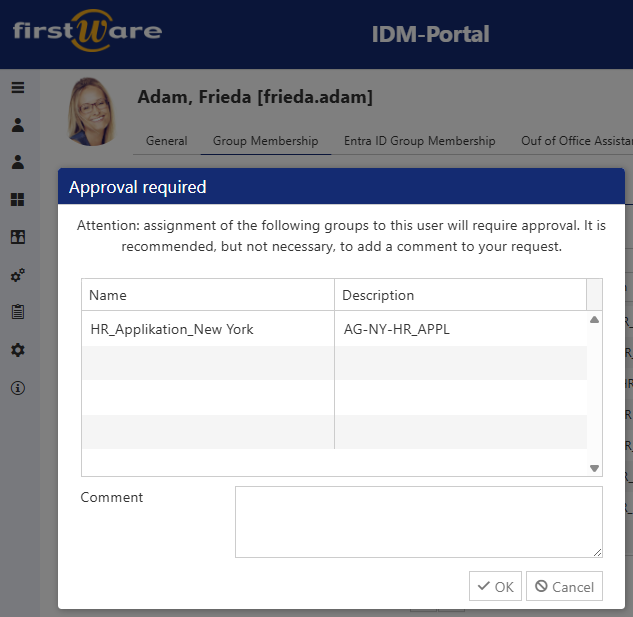
Approvals can also be integrated into the IDM-Portal. Those responsible receive a notification and can approve or reject group memberships.
If you’d like to find out more, read our latest blog post on how we integrated the HR system and IAM for a public sector client.
Conclusion
Zero-touch provisioning is not just an empty promise. On the contrary, it can be implemented in practice and significantly improves the workflow between HR and IT. The benefits are compelling: ZTP eliminates manual IT work, speeds up onboarding and ULM processes and ensures error-free, secure and scalable access rights management.
IT can focus on strategic tasks, whilst employees are productive from day one.
We recommend you speak to our experienced team!
More about the FirstWare IDM-Portal
 The FirstWare IDM-Portal from FirstAttribute is an integrated solution for Identity and Access Management (IAM) that enables the automated management of users and their permissions, whether on-premises or in the cloud.
This portal integrates all aspects of identity and access management and provides centralised access to identity and directory services.
